
I was walking someone through how to build an “AI agent” for their email the other day, and it reminded me how overcomplicated people make this. At one point they said, “I literally thought it was like… a standalone thing on a computer doing stuff.” It’s not. Most of what people call an agent is just a workflow.
What an “agent” actually is
The simplest way to think about it is: trigger → processing → output. On the call I said, “An agent is like—you start with something and you get something done.” In this case, an email comes in, the AI reads it, and then something happens like moving it to a folder or drafting a reply. That’s the entire system. You don’t need a framework, you don’t need infra, you don’t need anything fancy.
The use case that works really well
The specific problem we were talking about was customer emails. They already had a human doing it and said, “I’ve scripted the shit out of it… it’s an if-then formula.” That’s exactly where AI works well. If a person is reading emails, following rules, and replying in a consistent way, you can usually automate most of it.
The basic workflow
At a high level the flow is simple: new email comes in, send it to an AI model, have it decide what to do, then take that action. In n8n this is literally just nodes connected together. I showed something like “read from Gmail → send to OpenAI → get response → move email,” and that’s the whole “agent.”
How you actually “build” it
The big question was, “What does it mean to build an agent?” The answer is you just write instructions. You treat the model like a very literal employee. You say: you are my email assistant, here is the email, here are the possible outcomes, decide what to do. There’s no real code logic required. At one point I said, “You can just paste your if-then rules in there and be like, stick to this format,” and that’s genuinely enough for most use cases.
The lazy (and effective) approach
If you already have good replies, you don’t even need to think that hard. “You could even just look at the last 10 emails, copy paste them, and throw that in.” The model will pick up tone, structure, and how you ask questions without you doing anything fancy.
Start with drafts, not auto-send
One of the most useful patterns is to not let it send emails right away. “Have it create drafts instead of sending.” I do this for outbound as well. The workflow becomes: email comes in, AI writes a reply, it saves as a draft, and you review it. After you’ve seen enough good outputs, then you can automate further.
Where people mess this up
This is where things usually go wrong. You start with something simple like replying to emails, and then it turns into parsing data, creating Shopify orders, updating a CRM, building dashboards, and so on. On the call we talked about how “the problem just gets bigger and bigger… and you don’t finish anything.” The right move is to pick something small that actually delivers value immediately and get it working end to end.
A good first project
A very solid starting point is customer email → draft reply. It’s slightly more interesting than just sorting but still simple. For example, someone asks for a sample, the AI checks if information is missing, asks for it if needed, and drafts a response. It’s repetitive, structured, and already basically an if-then system.
The moment it clicks
There’s always a moment where it simplifies in someone’s head. On this call it was, “Oh, okay… I can do that.” That’s usually the unlock. People assume this requires multiple agents or complex systems, but it’s just a trigger, an LLM, and an action.
The only real complexity
The only time this starts to feel more “technical” is when you connect multiple systems. For example, going from email text to something structured for another tool like Shopify. But even that is manageable with something like n8n once you have the basic pattern down.
The template (built in n8n)
I put this into a simple n8n workflow so you don’t have to wire everything up yourself.
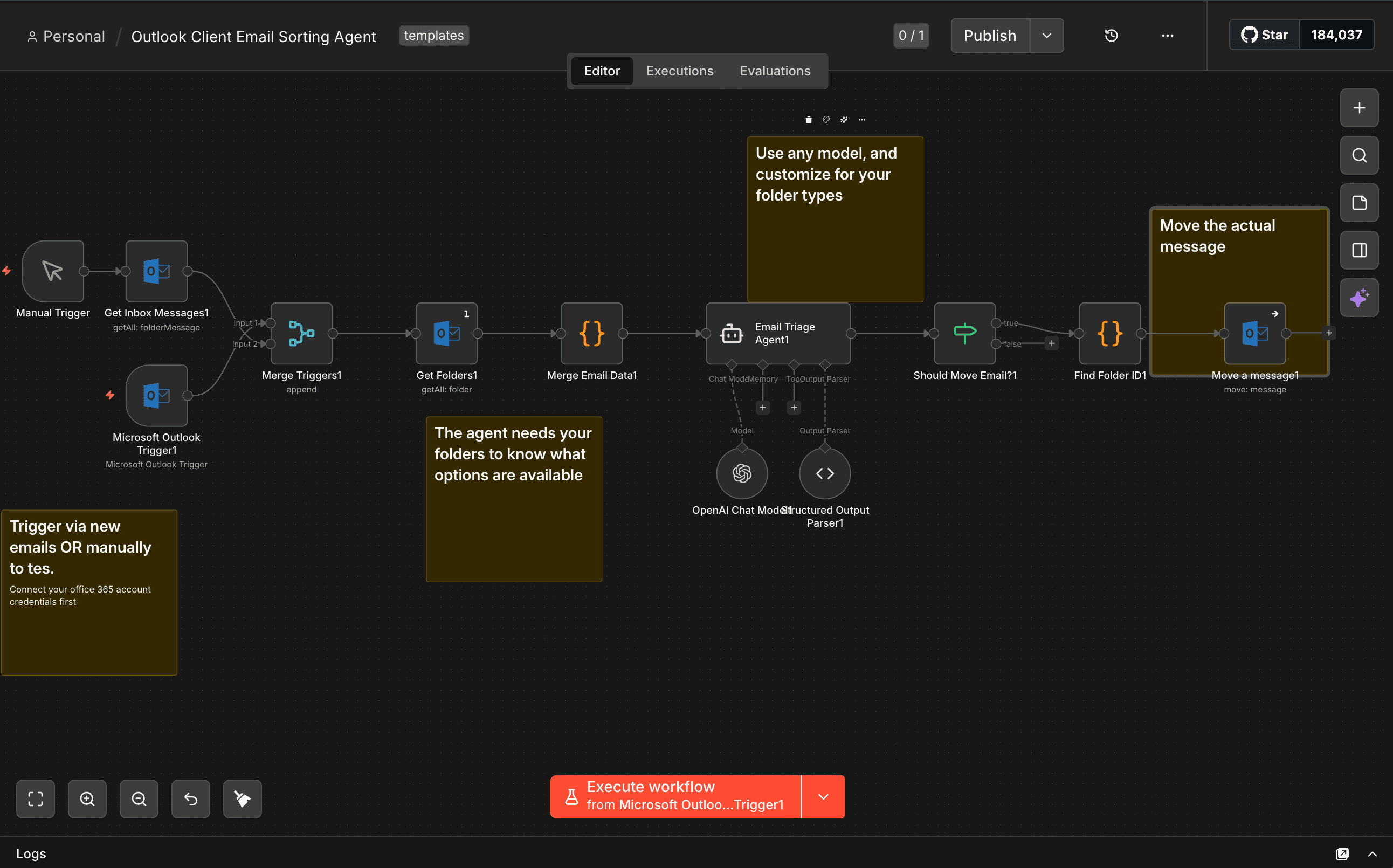
At a high level, it’s doing exactly what we talked about: Outlook trigger → AI → action. The workflow listens for new emails in your inbox, pulls in the message data, sends it to an AI model with a list of your available folders, and then decides whether to move it and where it should go.
There are a couple small but important details that make it work cleanly. First, it fetches all your Outlook folders up front so the model can only choose from real options (this avoids hallucinating folder names). Then it uses a structured output (basically forcing the model to return something like { shouldMove: true, targetFolder: "Finance" }) so the rest of the workflow can reliably act on it. After that, it maps the folder name to the actual Outlook folder ID and moves the message.
n8n is a good fit for this because it’s just visual plumbing. You’re not writing backend code, you’re connecting steps: trigger, transform, decide, act. The “agent” is really just the AI node in the middle, and everything else is making sure it gets the right inputs and produces something usable.
If you open the template, you’ll see it’s not doing anything fancy. That’s intentional. It’s meant to be something you can actually understand and modify, not a black box. The only thing you really need to change is the prompt (what folders you have and how you want things categorized), and everything else should just work.
TL;DR
If you want to build your first email agent, use n8n, trigger on a new email, send it to GPT or Claude, tell it what to do in plain English, and then move the email or draft a reply. That’s it.
I also recorded a walkthrough and included an n8n template so you can copy it and tweak it.
Copy / Paste this JSON and upload it to your N8N to get started!
json{
  "name": "Outlook Client Email Sorting Agent",
  "nodes": [
    {
      "parameters": {},
      "id": "393f950c-fe20-457d-abd4-11f6a6ff7486",
      "name": "Manual Trigger",
      "type": "n8n-nodes-base.manualTrigger",
      "typeVersion": 1,
      "position": [
        2400,
        1088
      ]
    },
    {
      "parameters": {
        "pollTimes": {
          "item": [
            {
              "mode": "everyHour"
            }
          ]
        },
        "filters": {
          "foldersToInclude": "={{ [\"inbox\"] }}"
        },
        "options": {}
      },
      "type": "n8n-nodes-base.microsoftOutlookTrigger",
      "typeVersion": 1,
      "position": [
        2592,
        1840
      ],
      "id": "ba25b499-e243-413e-9544-296ed1b75731",
      "name": "Microsoft Outlook Trigger1",
      "credentials": {
        "microsoftOutlookOAuth2Api": {
          "id": "6LN4ox93hMJPRpYx",
          "name": "Microsoft Outlook account"
        }
      }
    },
    {
      "parameters": {
        "operation": "move",
        "messageId": {
          "__rl": true,
          "mode": "id",
          "value": "={{ $json.id }}"
        },
        "folderId": {
          "__rl": true,
          "mode": "id",
          "value": "={{ $json.folderId }}"
        }
      },
      "type": "n8n-nodes-base.microsoftOutlook",
      "typeVersion": 2,
      "position": [
        4288,
        1744
      ],
      "id": "7de931b4-78fc-403f-94fb-0d450435419d",
      "name": "Move a message1",
      "webhookId": "5b20a979-d2bc-4887-9ef2-74963d659c47",
      "credentials": {
        "microsoftOutlookOAuth2Api": {
          "id": "6LN4ox93hMJPRpYx",
          "name": "Microsoft Outlook account"
        }
      },
      "onError": "continueRegularOutput"
    },
    {
      "parameters": {
        "resource": "folderMessage",
        "folderId": {
          "__rl": true,
          "value": "Inbox",
          "mode": "id"
        },
        "returnAll": true,
        "options": {
          "downloadAttachments": false
        }
      },
      "id": "8c56485b-a073-4ea8-a684-b0efd431fddb",
      "name": "Get Inbox Messages1",
      "type": "n8n-nodes-base.microsoftOutlook",
      "typeVersion": 2,
      "position": [
        2592,
        1648
      ],
      "webhookId": "9f6ee54c-ceb9-46c7-8d76-0c5780a9b947",
      "credentials": {
        "microsoftOutlookOAuth2Api": {
          "id": "6LN4ox93hMJPRpYx",
          "name": "Microsoft Outlook account"
        }
      }
    },
    {
      "parameters": {},
      "id": "ac90c82b-3e5c-478d-b682-9a08b0bf87bc",
      "name": "Merge Triggers1",
      "type": "n8n-nodes-base.merge",
      "typeVersion": 3.2,
      "position": [
        2816,
        1744
      ]
    },
    {
      "parameters": {
        "promptType": "define",
        "text": "=Email from: {{ $json.from }}\nSubject: {{ $json.subject }}\nPreview: {{ $json.bodyPreview }}\n\nAvailable folders: {{ $json.availableFolders }}",
        "hasOutputParser": true,
        "options": {
          "systemMessage": "You are an email triage assistant that categorizes incoming emails and decides whether they should be moved to specific folders or kept in the inbox for action.\n\nYour task is to:\n1. Analyze the email sender, subject, and preview content\n2. Review the list of available folders provided\n3. Determine if the email should be moved to one of the available folders or kept in inbox\n4. Return your decision in the structured format\n\nCategorization guidelines:\n- Finance-related folders: Emails from Brex, financial institutions, invoices, receipts, expense reports\n- Marketing-related folders: Paid guest post requests, marketing proposals, advertising inquiries, SEO services\n- Keep in inbox: Emails from lawyers, patent-related correspondence, urgent requests, personal contacts, anything requiring immediate action or response\n\nIMPORTANT: You MUST choose a folder name from the \"Available folders\" list provided. Use the EXACT folder name as it appears in the list. If no suitable folder exists or the email needs action, set shouldMove to false.",
          "returnIntermediateSteps": false,
          "passthroughBinaryImages": true,
          "enableStreaming": true
        }
      },
      "id": "6af42930-16a3-40f7-8c42-2e3e06c2666b",
      "name": "Email Triage Agent1",
      "type": "@n8n/n8n-nodes-langchain.agent",
      "typeVersion": 3,
      "position": [
        3488,
        1744
      ]
    },
    {
      "parameters": {
        "model": {
          "__rl": true,
          "value": "gpt-5.4-mini",
          "mode": "list",
          "cachedResultName": "gpt-5.4-mini"
        },
        "builtInTools": {},
        "options": {}
      },
      "id": "c6c89ecb-d581-4571-9ee8-fda61852007c",
      "name": "OpenAI Chat Model1",
      "type": "@n8n/n8n-nodes-langchain.lmChatOpenAi",
      "typeVersion": 1.3,
      "position": [
        3504,
        1968
      ],
      "credentials": {
        "openAiApi": {
          "id": "cK42xNH3SfR1i20H",
          "name": "OpenAi account"
        }
      }
    },
    {
      "parameters": {
        "jsonSchemaExample": "{\n\t\"shouldMove\": true,\n\t\"targetFolder\": \"Finance\",\n\t\"reason\": \"Email from Brex about expenses\"\n}"
      },
      "id": "477eb805-1859-4d16-858c-3ca4e618e752",
      "name": "Structured Output Parser1",
      "type": "@n8n/n8n-nodes-langchain.outputParserStructured",
      "typeVersion": 1.3,
      "position": [
        3632,
        1968
      ]
    },
    {
      "parameters": {
        "conditions": {
          "options": {
            "caseSensitive": true,
            "leftValue": "",
            "typeValidation": "loose",
            "version": 3
          },
          "conditions": [
            {
              "id": "id-1",
              "leftValue": "={{ $json.output.shouldMove }}",
              "operator": {
                "type": "boolean",
                "operation": "true"
              }
            }
          ],
          "combinator": "and"
        },
        "looseTypeValidation": true,
        "options": {}
      },
      "id": "da275b54-af31-449b-9acd-5a9d54ea8b2c",
      "name": "Should Move Email?1",
      "type": "n8n-nodes-base.if",
      "typeVersion": 2.3,
      "position": [
        3840,
        1744
      ]
    },
    {
      "parameters": {
        "jsCode": "const folders = $('Get Folders1').all();\nconst folderNames = folders.map(f => f.json.displayName).join(', ');\nconst folderList = folders.map(f => ({ name: f.json.displayName, id: f.json.id }));\n\nconst emailItems = $('Merge Triggers1').all();\n\n// Get processed email IDs from execution metadata\nconst executionData = $execution.customData?.processedEmails || [];\n\n// Filter out already processed emails\nconst newEmails = emailItems.filter(item => !executionData.includes(item.json.id));\n\nreturn newEmails.map(item => ({\n  json: {\n    ...item.json,\n    availableFolders: folderNames,\n    folderList: folderList\n  }\n}));"
      },
      "id": "4622630c-4565-4677-8767-577986bdb45b",
      "name": "Merge Email Data1",
      "type": "n8n-nodes-base.code",
      "typeVersion": 2,
      "position": [
        3264,
        1744
      ]
    },
    {
      "parameters": {
        "resource": "folder",
        "operation": "getAll",
        "returnAll": true,
        "filters": {},
        "options": {}
      },
      "id": "cad113c4-e10b-4c25-ac6a-eb585902c193",
      "name": "Get Folders1",
      "type": "n8n-nodes-base.microsoftOutlook",
      "typeVersion": 2,
      "position": [
        3040,
        1744
      ],
      "webhookId": "99df00f7-350c-49d3-be15-0926bc74e38a",
      "executeOnce": true,
      "credentials": {
        "microsoftOutlookOAuth2Api": {
          "id": "6LN4ox93hMJPRpYx",
          "name": "Microsoft Outlook account"
        }
      }
    },
    {
      "parameters": {
        "mode": "runOnceForEachItem",
        "jsCode": "const agentOutput = $input.item.json;\nconst targetFolderName = agentOutput.output.targetFolder;\n\n// Get the corresponding email data from Merge Email Data using the same item index\nconst itemIndex = $itemIndex;\nconst mergeEmailData = $('Merge Email Data1').all()[itemIndex].json;\nconst folderList = mergeEmailData.folderList;\n\nif (!folderList) {\n  throw new Error('folderList not found in Merge Email Data');\n}\n\nconst folder = folderList.find(f => f.name === targetFolderName);\n\nif (!folder) {\n  throw new Error(`Folder '${targetFolderName}' not found in available folders: ${folderList.map(f => f.name).join(', ')}`);\n}\n\nreturn {\n  json: {\n    id: mergeEmailData.id,\n    folderId: folder.id,\n    targetFolder: targetFolderName\n  }\n};"
      },
      "id": "44cd2968-5e50-4a74-b227-d0d06d0af373",
      "name": "Find Folder ID1",
      "type": "n8n-nodes-base.code",
      "typeVersion": 2,
      "position": [
        4064,
        1744
      ]
    },
    {
      "parameters": {
        "content": "## Trigger via new emails OR manually to tes.\n\nConnect your office 365 account credentials first\n",
        "height": 256,
        "width": 272
      },
      "type": "n8n-nodes-base.stickyNote",
      "position": [
        2400,
        2064
      ],
      "typeVersion": 1,
      "id": "88c0831b-bfcf-4c0b-8a5b-9c881a3c48a1",
      "name": "Sticky Note"
    },
    {
      "parameters": {
        "content": "## The agent needs your folders to know what options are available",
        "height": 256,
        "width": 272
      },
      "type": "n8n-nodes-base.stickyNote",
      "position": [
        3056,
        1920
      ],
      "typeVersion": 1,
      "id": "0db1f5e8-dca4-4b6b-b28c-29efac78a0fe",
      "name": "Sticky Note1"
    },
    {
      "parameters": {
        "content": "## Use any model, and customize for your folder types",
        "height": 256,
        "width": 272
      },
      "type": "n8n-nodes-base.stickyNote",
      "position": [
        3552,
        1488
      ],
      "typeVersion": 1,
      "id": "d19c5bb7-d403-4f43-9004-6a0a70f2c763",
      "name": "Sticky Note2"
    },
    {
      "parameters": {
        "content": "## Move the actual message",
        "height": 256,
        "width": 272
      },
      "type": "n8n-nodes-base.stickyNote",
      "position": [
        4304,
        1536
      ],
      "typeVersion": 1,
      "id": "5e4c8275-891c-46e8-a7b4-135247140fb1",
      "name": "Sticky Note3"
    }
  ],
  "pinData": {},
  "connections": {
    "Manual Trigger": {
      "main": [
        [
          {
            "node": "Get Inbox Messages1",
            "type": "main",
            "index": 0
          }
        ]
      ]
    },
    "Microsoft Outlook Trigger1": {
      "main": [
        [
          {
            "node": "Merge Triggers1",
            "type": "main",
            "index": 0
          }
        ]
      ]
    },
    "Get Inbox Messages1": {
      "main": [
        [
          {
            "node": "Merge Triggers1",
            "type": "main",
            "index": 1
          }
        ]
      ]
    },
    "Merge Triggers1": {
      "main": [
        [
          {
            "node": "Get Folders1",
            "type": "main",
            "index": 0
          }
        ]
      ]
    },
    "Email Triage Agent1": {
      "main": [
        [
          {
            "node": "Should Move Email?1",
            "type": "main",
            "index": 0
          }
        ]
      ]
    },
    "OpenAI Chat Model1": {
      "ai_languageModel": [
        [
          {
            "node": "Email Triage Agent1",
            "type": "ai_languageModel",
            "index": 0
          }
        ]
      ]
    },
    "Structured Output Parser1": {
      "ai_outputParser": [
        [
          {
            "node": "Email Triage Agent1",
            "type": "ai_outputParser",
            "index": 0
          }
        ]
      ]
    },
    "Should Move Email?1": {
      "main": [
        [
          {
            "node": "Find Folder ID1",
            "type": "main",
            "index": 0
          }
        ]
      ]
    },
    "Merge Email Data1": {
      "main": [
        [
          {
            "node": "Email Triage Agent1",
            "type": "main",
            "index": 0
          }
        ]
      ]
    },
    "Get Folders1": {
      "main": [
        [
          {
            "node": "Merge Email Data1",
            "type": "main",
            "index": 0
          }
        ]
      ]
    },
    "Find Folder ID1": {
      "main": [
        [
          {
            "node": "Move a message1",
            "type": "main",
            "index": 0
          }
        ]
      ]
    }
  }
}